Hero Video Setup Guide
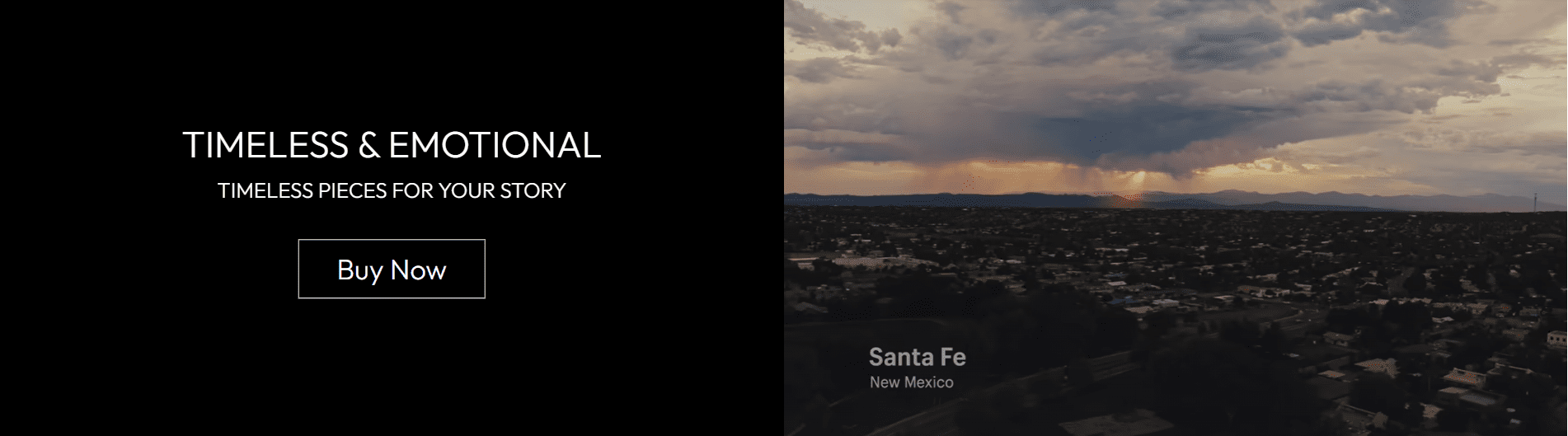
This guide explains how to configure the Hero Video section of your Shopify store—your store’s top-most (hero) area, used to share brand stories, showcase key content, and drive clicks to your products (like the "Timeless & Emotional" example shown).
All settings mentioned below can be found in:
Online Store → Themes → Customize → Hero Video
Hero Background & Video Source
Hero Background
The base color displayed behind your video (or when the video isn’t loading).
- Choose a color that matches your video’s palette (e.g.,
#000000 (black) for dark, moody videos). - Ensure contrast with your text (light text on dark backgrounds, dark text on light backgrounds).
Video URL
The link to your hero video (supports YouTube, Vimeo, or direct mp4 files).
- Use YouTube/Vimeo for hosting (avoids your store’s bandwidth costs).
- For
mp4: Compress files to under 50MB (use tools like HandBrake). - Note: Not all Vimeo features (e.g., custom players) are supported.
Large mp4 files (over 50MB) will slow down your page load—this hurts user experience and conversions.
Video Alt Text
Accessibility text for screen readers (critical for users with visual impairments).
- Describe the video’s content: "Close-up of a person with braided hair discussing Indigenous wealth creation."
- Include key context: "Brand story video for artisanal product line."
- Avoid generic text like "Hero video" (it’s not helpful for screen reader users).
Copy a key quote from the video (e.g., "'As a native person, it was always based on creating wealth'") into the alt text for extra context.
Fallback Image
Displays when the video fails to load (slow connections, device restrictions).
- Click Select to upload a key frame from your video (matches the visual style).
- Use
1920 x 1080 jpg (matches the 16:9 video ratio). - Use Explore free images if you don’t have a video frame.
The fallback image ensures your hero section looks polished even when the video doesn’t load—don’t skip this step!
Video & Layout Dimensions
Video Ratio
The aspect ratio of your video (matches the video’s native dimensions).
- 16:9: Standard widescreen (best for most videos).
- 5:4: Square-ish (better for close-up, focused videos).
Match the ratio to your video to avoid black bars (e.g., use 16:9 for YouTube videos).
Full Screen Width
Toggle to make the video span the entire browser width.
- Enabled (default): Immersive, modern look (recommended for hero sections).
- Disabled: Constrained width (rarely used for hero areas).
Full Screen Height
Toggle to make the video fill the entire browser height.
- Use cautiously: On mobile, full height may push content below out of view.
- Test on mobile if enabled to ensure users can see the "Buy Now" button.
Text & Button Placement
Text Alignment
Horizontal alignment of your hero text (e.g., "Timeless & Emotional") and "Buy Now" button.
- Center: Balanced (works for most videos).
- Left/Right: Use if your video has empty space on one side (avoids overlapping key visuals).
Vertical Content Position
Slider (0% = top, 100% = bottom, default 50%): Adjusts where text/buttons sit vertically.
- Slide to 30% to place content higher (if the video’s subject is lower).
- Slide to 70% to place content lower (if the video’s subject is higher).
Horizontal Content Position
Slider (0% = left, 100% = right, default 50%): Desktop-only (smaller screens auto-adjust).
- Position text in empty areas of the video (e.g., 20% left if the video’s subject is on the right).
Responsive Video Display
Video Focus Area
Selects which part of the video to prioritize on small (mobile) screens (videos are cropped on mobile).
- Left/Center/Right: Match to your video’s key subject (e.g., "Right" if the speaker is on the right).
- Ensures the most important visual is visible on mobile.
Text Readability
Use Text Protection Layer
Toggle to darken/lighten the video behind your text (fixes text blending into the video).
- Enable if your text is hard to read (e.g., light text on a bright video).
- Disable if the video already has high contrast with text.
Text Protection Layer Slider
Adjusts the darkness/lightness of the protection layer (0 = no change, higher = darker).
- Start at 20-30% (enough contrast without hiding the video).
- Avoid 100% (it turns the background solid black/white).
Section Spacing
Top Spacing
Padding above the hero section (default: 0 px).
- Keep at 0 (the hero section should sit at the very top of your store).
Bottom Spacing
Padding below the hero section (default: 10 px).
- Increase to 20-40px if the next section feels too close to the hero.
- Decrease to 5px if you want a tight, compact layout.
Advanced Settings
Theme Settings
Dropdown to access theme-wide styles (e.g., text colors, button designs) that apply to the hero section.
- Use this to match the hero section to your brand’s global style.
Custom CSS
Dropdown for advanced users to add custom CSS (e.g., adjust button padding, add text shadows).
- Only use if you know CSS—incorrect code can break your store’s layout.
Best Practices
- Keep videos short (15-30 seconds) to avoid user drop-off.
- Mute videos by default (most users prefer silent auto-play).
- Test on mobile: Ensure text is readable and the video focus area shows key content.
- Optimize video file size (under 50MB) for fast loads.
- Check accessibility: Add detailed alt text and use the text protection layer for contrast.
A well-optimized hero video grabs attention, tells your brand story, and encourages clicks on the "Buy Now" button—invest time in testing video, text, and layout for best results!